Loading...
Our Latest Blogs
Word to PDF – Convert Documents Easily with PDF Flyer
January 20, 2026
Converting Word documents into PDF format is essential when you want to share files professionally, preserve formatting, and prevent unwanted edits. PDFs are widely used for resumes, reports, contracts, and official documents because they look the same on every device. --- ## Why Convert Word to PDF? Converting Word files to PDF helps you: - Preserve original layout and fonts - Share documents professionally - Prevent accidental changes - Ensure compatibility across all devices PDF Flyer makes the conversion process simple and reliable for everyone. --- ## How to Convert Word to PDF Using PDF Flyer Follow the steps below to convert your Word document into a PDF file. ### Step 1: Open the Word to PDF Tool 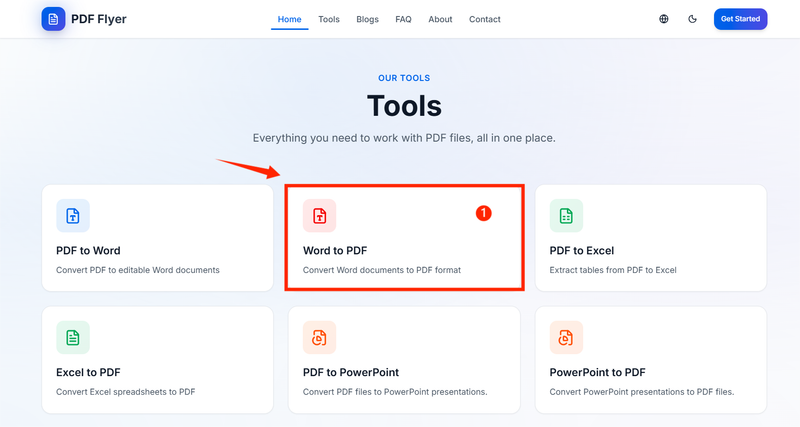 Open the Word to PDF tool on PDF Flyer, as shown in Image 1. You will see the upload interface ready for conversion. --- ### Step 2: Upload Your Word File 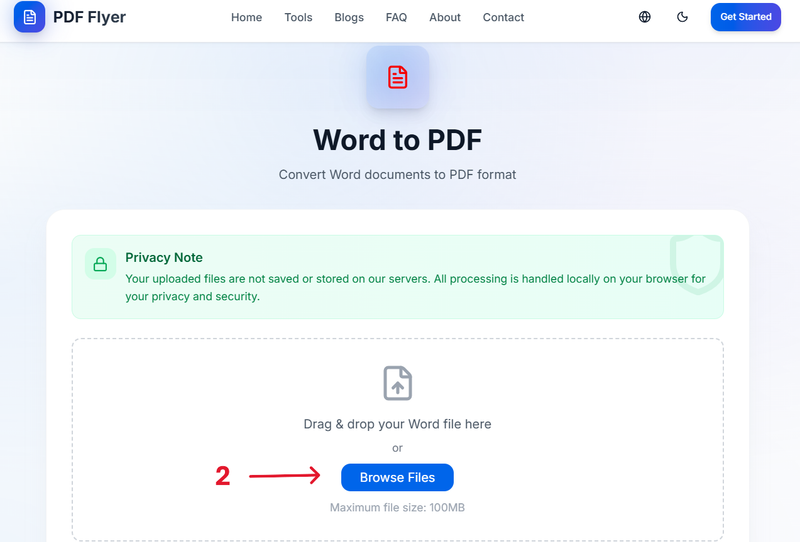 Click on **Browse** to upload your Word file, or simply drag and drop the document into the upload area, as shown in Image 2. --- ### Step 3: Convert the File 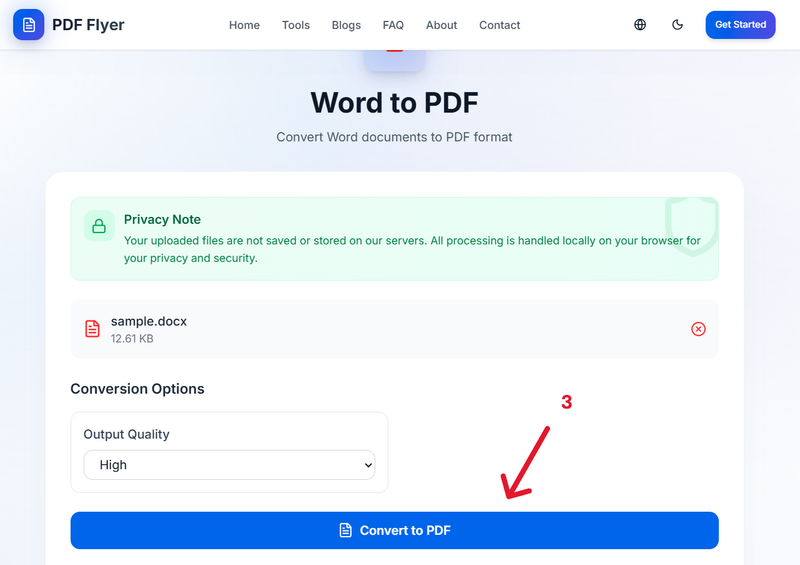 After uploading the file, click on **Convert** as shown in Image 3. The conversion will start immediately and usually completes within a few seconds. --- ### Step 4: Download Your PDF Document 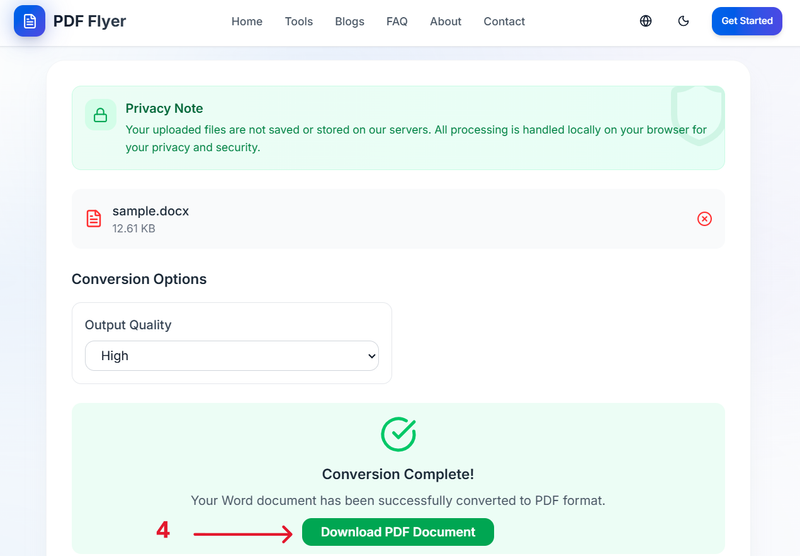 Once the conversion is finished, you will see the **Download PDF Document** button, as shown in Image 4. Click it to download your PDF file, and you’re done. --- ## Secure and Privacy-Friendly PDF Flyer focuses on simplicity and responsible file handling while completing the requested conversion. --- ## Need Help or Have Questions? If you face any issues or have questions while using the Word to PDF tool, feel free to share your feedback. We are always happy to help. 👉 https://pdflyer.com/contact --- This guide explains how to convert Word files into PDF format using PDF Flyer.
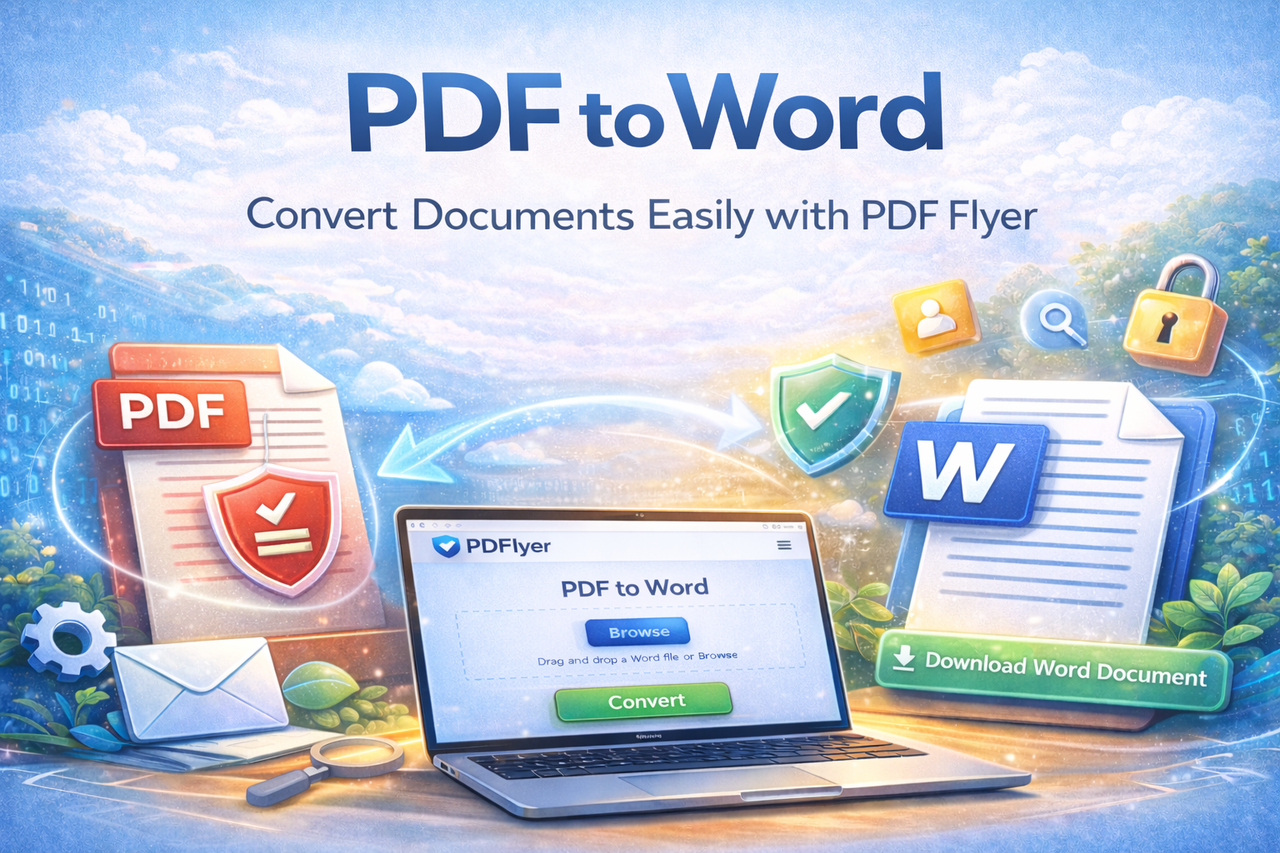
Convert PDF to Word Online Easily with PDFlyer
January 17, 2026
Working with PDF files is part of daily digital life, but editing them can be challenging. PDFs are designed to preserve layout, not to be modified. That’s why converting a PDF into an editable Word document is often the smartest solution. With **[PDF Flyer](https://pdflyer.com/)**, you can convert PDF to Word online quickly, securely, and directly in your browser—no installation and no registration required. --- ## Why Convert PDF to Word? Converting a PDF to Word allows you to: - Edit text and formatting easily - Reuse content without retyping - Update documents faster - Collaborate more efficiently PDF Flyer makes this process simple and accessible for everyone. --- ## How to Convert PDF to Word Using PDF Flyer Follow these simple steps to convert your PDF file into an editable Word document. ### Step 1: Open the PDF to Word Tool Visit the **[PDF to Word tool](https://pdflyer.com/pdf-to-word)** on PDF Flyer. The tool will open in a new window, ready for file upload. --- ### Step 2: Upload Your PDF File Click on **Browse** to select the PDF file you want to convert, or simply drag and drop the file into the upload area. After uploading, confirm that the file name is visible. This indicates the file has been uploaded successfully. Once confirmed, click on **Convert** to start the process. --- ### Step 3: Download the Converted Word File Wait a few seconds while the conversion is completed. Once finished, you will see the option to download your Word file. Click **Download** and your document will be ready to edit and use. --- ## Secure and User-Friendly Conversion PDF Flyer focuses on simplicity and responsible file handling while completing the requested task. The tool is fast, reliable, and works smoothly on all modern devices. --- ## Need Help or Want to Share Feedback? If you face any issues while using the PDF to Word tool or have questions, feel free to share your feedback. We are always happy to help. 👉 https://pdflyer.com/contact --- To convert your files instantly, you can use the PDF to Word tool available on PDF Flyer.
Why PDFlyer Puts Your Privacy First
September 14, 2025
In today’s digital world, we share and manage sensitive documents every day. From business contracts and financial reports to resumes and academic files, much of our personal and professional life exists in **PDF format**. This often raises important questions: *Where does my file go after upload? Is it stored? Who can access it?* At **[PDFlyer](https://pdflyer.com/)**, privacy is not an afterthought. It is a core principle that guides how our tools are built and operated. --- ## 🔐 Privacy by Design at PDFlyer PDFlyer is designed to process files **only for the task you request**—nothing more. ### 📄 File Processing Without Storage - Files are processed either **locally in your browser** or through **secure processing environments**, depending on the tool. - Your files are used solely to complete the requested operation, such as converting, merging, or editing PDFs. - PDFlyer does **not intentionally store, review, or share** your files beyond what is technically required to provide the service. This approach minimizes risk and ensures your documents remain under your control. --- ## ⚡ Automatic Deletion After Processing Once your task is completed: - Files are not kept longer than necessary. - Temporary data created during processing is removed. - Refreshing the page or completing the download ends the session. This reduces exposure and prevents unnecessary retention of user data. --- ## 🌐 Information Collected Automatically Like most modern websites, PDFlyer may collect limited technical data through integrated third-party services, including: - IP address - Browser and device information - Cookies and usage data - Ad interaction data This information helps improve performance, security, and user experience. It is **not used to access or analyze your files**. --- ## 🍪 Cookies and User Control Cookies are used to: - Enable advertising - Measure ad performance - Improve website functionality You can manage or withdraw your cookie consent at any time using: - The consent management interface on the website - Your browser settings Please note that disabling cookies may affect some features of the service. --- ## 🇪🇺 User Consent for EEA, UK & Switzerland For users in the **EEA, UK, and Switzerland**, PDFlyer uses a **Google-certified Consent Management Platform (CMP)**. This ensures advertising consent is collected transparently and in compliance with regional data protection laws. --- ## 🤝 Trusted Third-Party Processing Partners To provide specific features, PDFlyer may rely on trusted processing partners: - Partners process files **only to perform the requested operation** - Files are **not retained or reused** for any other purpose All partners are selected with privacy and security in mind. --- ## 🔒 Data Security Measures PDFlyer applies reasonable technical and organizational safeguards to protect information. However, no online system can guarantee absolute security, and users should always exercise caution when sharing sensitive data online. --- ## 👶 Children’s Privacy PDFlyer does not knowingly collect personal information from children under the age of 13. --- ## 📢 Advertising Transparency The service may display ads from third-party networks such as Google AdSense. You can: - Disable personalized ads through Google’s ad settings - Adjust consent preferences using the site’s consent management platform PDFlyer does not control or endorse third-party advertisements or external websites. --- ## 🔄 Policy Updates Privacy practices may be updated from time to time. Any changes will be posted on the official Privacy Policy page on **[PDFlyer](https://pdflyer.com/)**. --- ## 🤝 Questions or Feedback? If you have questions about privacy or want to share feedback, feel free to contact us. We are always happy to help. 👉 **Contact:** https://pdflyer.com/contact --- ## ✅ Your Privacy, Your Files With **PDFlyer**, you never have to choose between convenience and privacy. Our tools are built to help you work efficiently—while respecting your data at every step.